AionBot First Run: Token, Profiles and Your First Night of Farming
A step-by-step AION 2 bot setup for AionBot: account, plan and token, the six sections of the bot window, a saved profile and a two-hour test night.
Most questions in the order chat are not about Kinah; they are about the first evening. This guide is the whole AION 2 bot setup for AionBot in one sitting, for a Daeva of any level on the global servers: the account, the plan, the token, a first pass through the Leveling, Grind, Gathering, Expeditions, Combat and Settings sections of the bot window, a saved profile, and a short, honest first night so you learn what the counters mean before you trust them with a longer evening. Checked on 13 November 2026 for AION 2 Global.
Where and what you need
A character and a goal. Any level works; a level 8 and a level 45 use the same window, only the section changes. Decide whether tonight is leveling, a grind spot, an Expedition run or a gathering lap, because the first profile you save should match it. With no plan of your own, the Elyos leveling route 1–20 or the Asmodian leveling route 1–20 is a gentle first profile, and the Kinah farming guide for beginners is the usual second.
An account on the site. Sign-up asks for a nickname and a password, nothing else. The nickname ties your orders, chats and token together, so pick one you will not forget, and write the password down.
A plan. AionBot sells time, not features: the 1 Month, 3 Months and 6 Months plans unlock the same bot for 30, 90 or 180 days, priced in dollars and paid in crypto at the live rate; see plans and pricing. Start with one month.
The game and an evening. The AION 2 PC client from Steam or PURPLE, signed in and standing in the world, the window in borderless or windowed mode, F5, F6 and F7 left free for the bot's Start, Pause and Stop, an emptied cube, and roughly two and a half hours: half an hour of setup, two of farming with the counters running.
The route
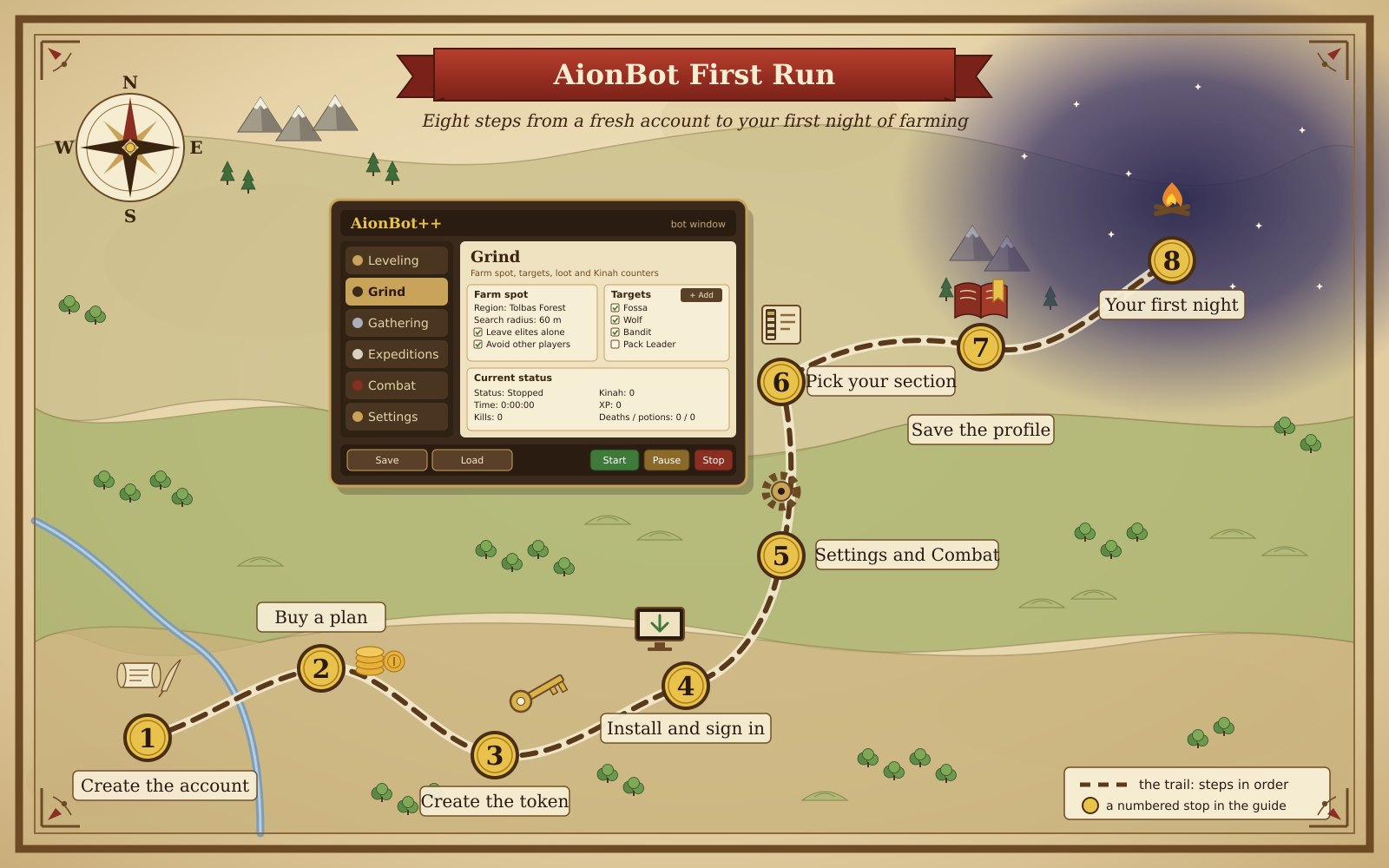
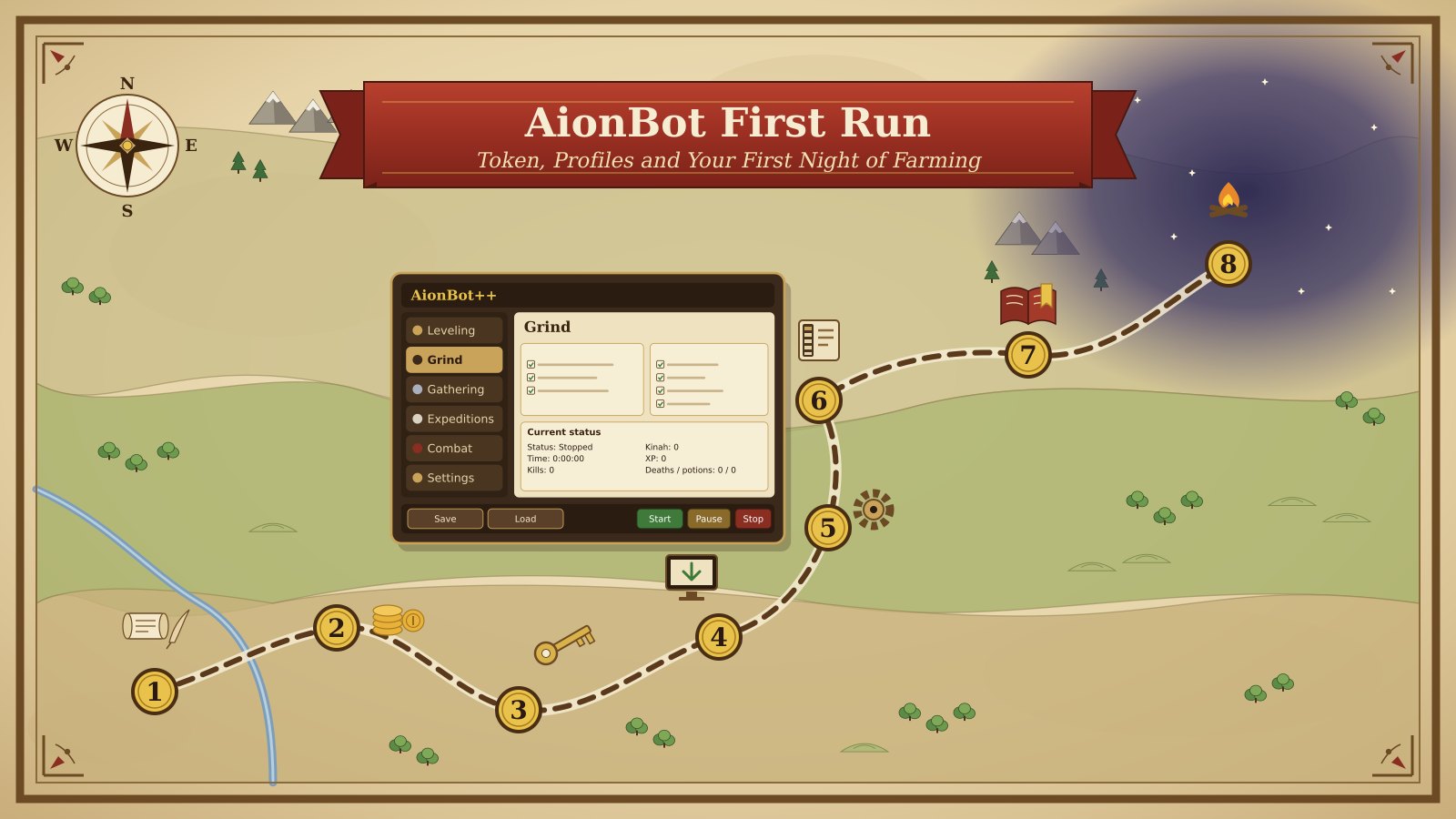
The numbers match the picture; do them in order.
- Create the account. Open the sign-in page, choose a nickname and a password, confirm the password. You land in an empty account: no orders, no subscription, and a Bot token panel that says No token yet.
- Buy a plan. Pick 1 Month, 3 Months or 6 Months. The order opens a chat with a payment address and an exact amount; send exactly that amount, every digit, because that is how the payment is recognised. New to crypto? The card-to-crypto guide walks through it.
- Create the token. In the account, press Create token in the Bot token panel. The full token is shown once; press Copy and store it somewhere safe, because afterwards only the last four characters are visible. The bot signs in with this token and anyone who has it can use your subscription, so it never goes into a screenshot.
- Install and sign in. Once the payment is recognised, the chat sends instructions and a link to your personal installer. Run it, paste the token, and the bot window opens with your Daeva's name, class and level in the sidebar and Stopped as the status. If no character shows, start the game, enter the world and paste again.
- Settings and Combat first. Open Settings before anything else. In Session, tick Planned breaks and set Break every and Break length; leave Stop at level on do not stop unless you have a level goal. In Stop and alerts, keep Stop when the character dies, Pause on a whisper and Sound alert on. Then open Combat: check that Class, Faction, Server and Name match your Daeva, set HP potion below and Rest below MP to numbers your class likes, and tick the skills you use in the Rotation, which runs top to bottom by priority.
- Pick tonight's section. Leveling wants a From and a To level, a Start region, and Accept and turn in quests ticked. Grind wants a Region, a Search radius and a Targets list built one Region mob at a time with + Add, with Pick up loot and Sell junk at the vendor ticked. Gathering wants the Skills you have ticked and Optimise the route on. Expeditions is a list for your level and Item Level; set Role and Loot rules, let the bot handle the queue and the ready check, and the pulls inside are yours.
- Save the profile. Press Save in the footer; it stores the setup for this character and section. Next time, press Load instead of flipping twenty boxes; one profile per activity saves the most time over a month.
- Your first night. Press Start. For ten minutes just watch the Log, the Current status panel and the Time, Kills and Kinah / h chips at the top. Then let it run while you stay at the keyboard, use Pause for the kettle, and press Stop at a time you decided on before you sat down. Two hours is a good first session.
What you get
| Section | What you set up on night one | What the status panel shows |
|---|---|---|
| Leveling | Level range, start region, quest, flight and Kibelisk options | Quest, quests turned in, XP / hour, time to next level, flight time |
| Grind | A region, a search radius, a target list, loot and cube rules | Time, kills, Kinah, XP, deaths and potions |
| Expeditions | The Expedition for your level and Item Level, role, loot rules, queue and ready check | Bosses, runs, Kinah / hour |
| Gathering | Gathering skills, region, route and behaviour options | Gathered, and the list of what you gathered this session |
| Settings and Combat | Breaks, stop rules and alerts; class, thresholds and the skill rotation | Nothing to count; they shape the other four |
| Footer | Saved profiles | Start, Pause, Stop and the save toast |
Time it takes
The account is roughly two minutes. The plan is roughly ten minutes to an hour, almost all of it waiting for the payment to confirm and for the chat to send your installer. Installing and pasting the token is roughly five minutes. The first pass through Settings, Combat and one section is roughly fifteen to thirty minutes, and building the Targets list for a new spot adds five to fifteen minutes.
The first night should be roughly two hours, and the Kinah / h chip will mislead you for the first twenty minutes because it has little to average yet. Judge the evening by the number at the end and expect it to come in under the guide you followed: the first hour includes a vendor trip and the odd poor pull.
Tips
- Do the steps in order: pay, create the token, install; the installer link arrives in the chat only after the payment is recognised.
- Keep the Search radius small where a spot hugs cliffs, roads or other camps and widen it in open fields; it is the one Grind setting worth touching on night one.
- Build the Targets list one Region mob at a time with + Add, untick the mob types you do not want, and keep Leave elites alone on.
- Save a profile before Start and after every change; Load is faster than remembering.
- Decide the session length before you sit down and let the Time counter hold you to it; tired players make bad pulls.
- Tick Sell junk at the vendor and Keep rare and better, but still sort the cube yourself at the end of the night and list the good materials on the Market by hand.
Running it with AionBot
For a farming first night, open Grind, pick the Region and set the Search radius, then add each mob type from Region mob with + Add. In Loot and cube tick Pick up loot, Sell junk at the vendor and Keep rare and better, and set Cube size to match your cube; In cube tells you when the vendor trip is coming.
For a leveling first night, open Leveling, set From to your current level and To no more than five levels higher, and keep Accept and turn in quests, Use flight on long trips and Teleport via Kibelisks on. Whichever section you choose, finish with Save; the next evening is then Load, Start and a cup of tea. Know the risk before you start: automation breaks NCSOFT's rules for AION 2, the game runs its own anti-cheat, and accounts get banned for it, so never bot on an account you cannot afford to lose.
FAQ
I closed the page before copying the token. Is it gone?
The full token is shown once; afterwards the account shows only the last four characters. Press Create token again in the Bot token panel, copy the new token straight away and paste it into the bot. Use a password manager this time.
Does the bot play while I am away from the keyboard?
It is built around you being at the keyboard. In Leveling, Grind and Gathering the bot moves, fights with your Rotation and loots, and Pause on a whisper and Stop when the character dies are there because someone should be watching; inside Expeditions every pull is yours.
Should I start with Leveling or Grind?
Grind, even if you want levels. One Region with three target types teaches the Log, the Rotation and the counters in twenty minutes, and the saved profile stays useful. Leveling has more moving parts; open it on the second evening once the window feels natural.
Want the farming done for you? Get the bot